Safari's .webloc files in macOS 27.2
November 8, 2026
For more than 20 years, I’ve had a habit of dragging URLs to my desktop. I’m not going to pretend it’s a great habit, but I found it a handy way to save a link I wanted to check out later. For whatever reason, Apple has recently made this a lot more annoying.
In case you didn’t know, Safari, Chrome, and Firefox allow you to turn URLs into .webloc files. Opening one takes you to the saved URL in your default browser. To make one: click on the URL bar and then drag the selected URL out. 1 If it lands in a text area, you’ll get the text of the URL. If it lands on the desktop or a Finder window, you’ll get a .webloc file. These files use the property list (plist) format, and are mostly just fancy wrappers around the URL text.
There are two main ways plist files can be formatted: XML-based and binary. Chrome and Firefox still save .webloc files using XML. Safari previously used the XML format, but started saving them as binary plists at some point. I looked through backups and found a .webloc file from December 30, 2022 that was still XML-based. I then found a binary plist .webloc saved on April 21, 2023. Both were created by Safari. macOS 13.2 was released on January 23, 2023, so I’m assuming that’s when Safari’s .webloc file format changed.
Fast forward to October 26, 2026. I installed macOS 27.2 when it was released. At that time, nothing changed about my .webloc usage. But on November 5, when trying to open a link I saved the day before, I saw this.
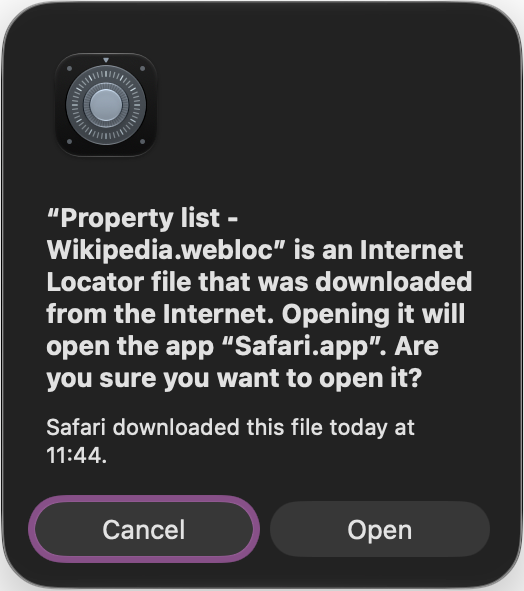
This freaked me out a bit, as I didn’t know what had changed. I had successfully opened a .webloc file the previous day without seeing a warning, and there hadn’t been any OS or Safari updates that I was aware of. A friend pointed me to a Reddit discussion about this, but this seems to have affected people as soon as they upgraded to 27.2. I then found this blog post discussing the same issue, posted on the same day I noticed it.
Binary plists generated by Safari all seem to have a com.apple.quarantine extended attribute set on them. Even the oldest one I could find (from April 21, 2023) has it. But that attribute didn’t affect anything until recently. I’m still not 100% sure what happened here. My best guess is that some underlying system (Gatekeeper? LaunchServices?) rolled out this behaviour over time after the macOS 27.2 launch.
As I mentioned, Firefox and Chrome both generate XML-based .webloc files. Those files continue to work normally without displaying a warning. They also don’t have the com.apple.quarantine extended attribute.
I tried using plutil to convert an affected .webloc file from Safari to an XML-based version, and then was able to open it without issue. I did this with plutil -convert xml1 -o newlink.webloc link.webloc, where link.webloc is the name of the file from Safari, and newlink.webloc is the new XML-based version. This isn’t really that surprising, though. The com.apple.quarantine extended attribute is the reason for the warning screen, and the conversion creates a new file without that attribute.
Maybe there are some new security issues with binary .webloc files. I’m willing to believe that. But if I drag a URL to the desktop, then shouldn’t it be considered safe? It’s also definitely not “downloaded from the internet”. Safari generated that file locally.
To me, the weirdest part is how this change was introduced. It took more than a week to affect me, but others were seeing it as soon as they updated. I’m still very curious why this is, and by what mechanism the change was introduced. Is there some .webloc exploit that people should know about? If so, should other browsers also quarantine these files? If not, why was this change made?
-
Actually, in Chrome and Firefox, it’s even easier. You can just drag the icon to the left of the URL without having to click the URL bar first. Safari also used to allow this, but it was changed in OS X 10.10 Yosemite. You can see the previous design here in OS X 10.9 Mavericks. ↩